
Sovereign Server: DeepSeek V4 Flash or Qwen3.8
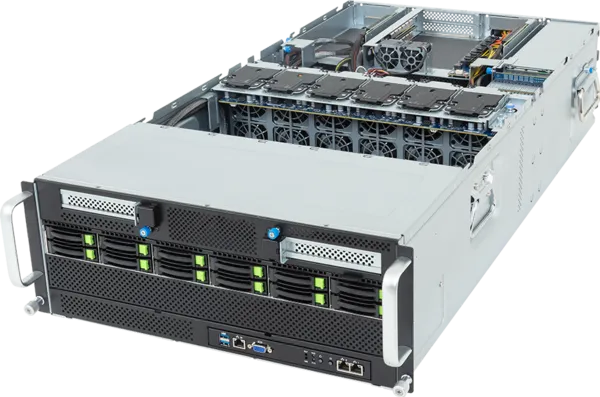
A 4U rack server with 8× NVIDIA RTX PRO 6000 Blackwell Server Edition GPUs and 768 GB VRAM, Helix pre-installed. Choose DeepSeek V4 Flash for qualified full-node throughput or Qwen3.8 for 153.3 tok/s single-stream and 208 scheduler slots.
We ship a fully configured rack server to your data centre with Helix pre-installed. Plug it in, power it on, and your team has a private AI agent fleet: 50+ developers running agents in parallel, each with their own GPU-accelerated desktop, with zero cloud dependency. No API keys, no token metering, no data leaving your building.
Learn why digital sovereignty matters →
Ready to buy? Purchase a Sovereign Server → · Talk to sales →
Hardware
The Sovereign Server is built on the Gigabyte G494-SB4, a 4U GPU-optimised server platform.
Base configuration:
| Component | Specification |
|---|---|
| GPUs | 8× NVIDIA RTX PRO 6000 Blackwell Server Edition (96 GB GDDR7 ECC each — 768 GB total VRAM) |
| CPU | Dual Intel Xeon 6505P (Xeon 6 series) |
| Memory | 256 GB+ DDR5 ECC Registered |
| Storage | 2× 3.2 TB NVMe SSD |
| Network | Dual 10GbE onboard |
| Power | Quad 3000W redundant (80+ Titanium) |
| Form factor | 4U rackmount, standard 19″ |
Configurations are customisable. We spec the server to your workload during onboarding.
Performance
This is the same class of hardware our production agent fleet benchmarks on — 8× NVIDIA RTX PRO 6000 Blackwell Server Edition cards with 768 GB of VRAM. We have qualified two serving configurations on it.
With DeepSeek V4 Flash (vLLM + DSpark speculative decoding, two TP=4 engines behind a sticky load balancer), that hardware sustains:
| Metric | Value |
|---|---|
| Box aggregate throughput (fresh decode) | ~947 tok/s |
| Single-stream decode (DSpark) | ~204 tok/s |
| Peak decode ceiling (measured) | ~1.82–1.89K output tok/s |
| Node aggregate @ 95–99% cache | ~1.1–1.7K output tok/s |
| Single active user @ 95–99% cache | ~165–205 output tok/s |
| Per-user average @ 24 concurrent (95–99% cache) | ~46–71 tok/s |
| Peak concurrency (measured) | 32+ concurrent requests |
With Qwen3.8-27B (eight single-GPU SGLang + DFlash2 engines behind ramjet), the current BF16-head production snapshot is:
| Metric | Value |
|---|---|
| Batch-1 greedy decode median | 153.3 tok/s |
| Matched checkpoint gain | +7.5% (142.6 → 153.3 tok/s) |
| Scheduler capacity | 26 slots/GPU, 208 fleet-wide |
| KV pool | 582,246 tokens/GPU |
| Correctness gates | 7/8 objective, 20/25 agent protocol — equal to the previous checkpoint |
Full-box saturation has not yet been rerun on the new Qwen weights, so we do not present the previous checkpoint's 7,882.6 tok/s result as current. Read the Qwen qualification and rollout →
DeepSeek generated output tokens, measured end-to-end. The numbers below are newly generated output tokens per second — not cached input reads. They include time to first token, scheduling, and remaining prefill. A typical Helix coding turn has 18.5K input tokens and 256 generated tokens, so the KV cache dominates real workloads:
| Cache-hit ratio | Single active user | Node aggregate @ ~24 users | Average per user @ c24 |
|---|---|---|---|
| ~100% / negligible prefill | 200–240 output tok/s | 1,820–1,890 tok/s | 76–79 tok/s |
| 99% | 170–205 output tok/s | 1,500–1,700 tok/s | 63–71 tok/s |
| 95% | 165–200 output tok/s | 1,100–1,300 tok/s | 46–54 tok/s |
| 0% | 75–100 output tok/s | 180–220 tok/s | 7–9 tok/s |
Key points:
- A single request runs on one TP4 engine (four GPUs), so one user cannot consume the entire ~1.8K tok/s node capacity.
- The second TP4 replica primarily increases concurrent and aggregate throughput.
- Once a response starts streaming, per-user decode can exceed the end-to-end number above; the table includes TTFT, scheduling, and remaining prefill.
- Longer responses amortise prefill better — for 512-token responses, node aggregate at 99% cache is ~1,550–1,750 tok/s and at 95% ~1,300–1,500 tok/s.
The practical headline: with 95–99% cache reuse, expect ~1.1K–1.7K generated tokens/sec across the node, while an individual user sees ~165–205 generated tokens/sec when alone or 46–71 tok/s averaged across a fully loaded 24-user node.
How many people does that support? Agentic work is bursty — agents alternate between generating tokens and running tools, tests, and sandboxes. Assuming one agent per person and a realistic sustained demand, a single Sovereign Server comfortably runs 50+ developers in parallel — the current K5 setup delivers ~46–79 tok/s per user across a fully loaded 24-user node at 95%+ cache, so even a 50+ developer team has plenty of headroom — with hundreds of concurrent agent desktops (GPU-accelerated video streaming via NVENC on top of the same cards).
And the model quality is frontier. The box runs DeepSeek-V4-Flash-0731 — 89.0% on ARC-AGI-1 and 61.4% on ARC-AGI-2 (verified, max effort) at a fraction of the cost of frontier cloud APIs:
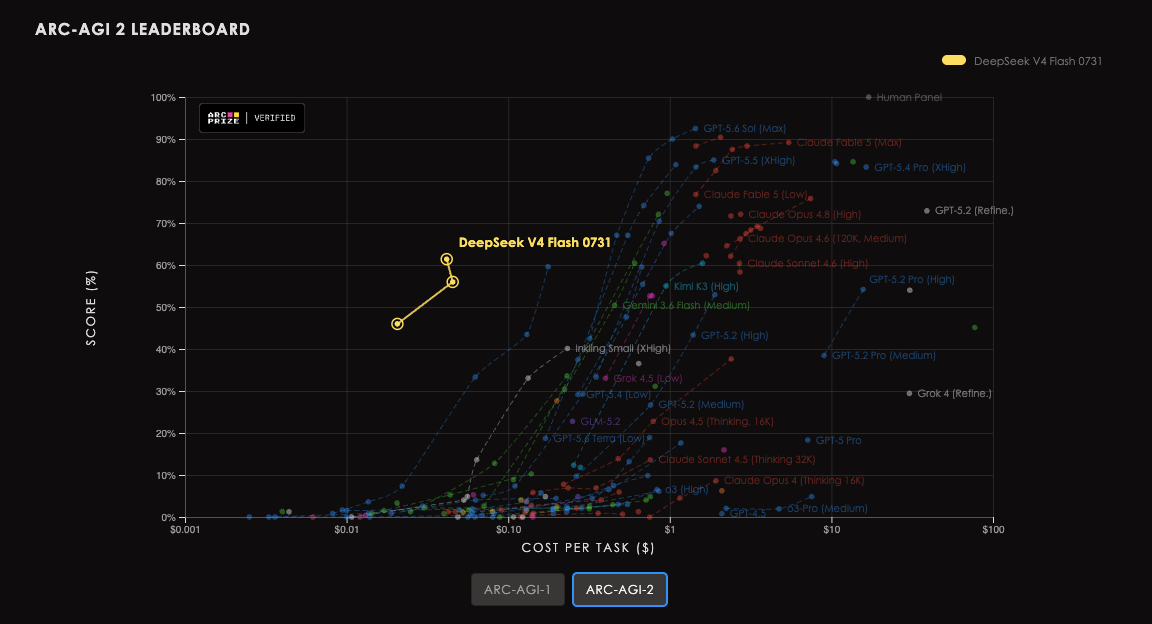
Source: ARC Prize. DeepSeek V4 Flash 0731 scores 89.0% ARC-AGI-1 / 61.4% ARC-AGI-2 at $0.02-0.04 per task — frontier reasoning on your own hardware.
See our engine benchmark post for the full methodology.
Cost comparison: server vs cloud tokens
The Sovereign Server is a one-time $175,000 purchase with no token metering. If you were paying for the same tokens on frontier cloud APIs, what would it cost? To keep this realistic, the chart below anchors token volume to a cloud-token budget per developer (default $800/month) — the amount a team actually spends — rather than assuming the server runs at max throughput forever. It then compares that recurring bill against the one-time server cost month over month.
That default sits at the lower end of real-world spend: "Monthly API costs per engineer ranged from $500 to $2,000 as adoption skyrocketed" — The AI token pricing crisis behind OpenAI and Anthropic's revenue race, Investing.com.
Real agent fleets burn through far more tokens than you'd expect — hundreds of millions to billions per person per day — because most of it is repeated context served from the KV cache. At a ~98% cache-hit rate, $800/month corresponds to ~895M tokens per developer served from that cache-heavy mix. Anthropic Opus 5 charges more per token than OpenAI GPT-Sol (effective ~$0.89/1M vs ~$0.59/1M after cache discounts), so the same workload costs more on Anthropic — the chart separates the two lines on that basis. With DeepSeek selected, the same box sustains ~1.1–1.7K generated output tok/s at 95–99% cache reuse (~1.82–1.89K peak decode ceiling), translating to roughly ~1.4B tokens per developer per month at the defaults — so a realistic workload uses about two-thirds of its capacity, leaving headroom to scale into.
A real heavy user on cloud processed 22.3B tokens across 514 sessions (~745M/active day) at a 98.5% cache-hit rate — spending ~$15.5K on Anthropic/OpenAI while cache savings came to ~$102K (6.6× the raw token cost). The cache is exactly why the effective cloud price is a fraction of list. Choose DeepSeek or Qwen in the calculator; Qwen shows its current qualified single-stream and scheduler figures but withholds fleet utilization until the new checkpoint has a full-box run:
Assumptions: token workload is anchored to a $800/developer/month cloud budget — both providers carry the same 894.9m/dev/mo workload, but Anthropic Opus 5 charges more per token than OpenAI GPT-Sol, so its line rises faster and crosses the server line sooner. Cloud price = cached at $0.30/1M + fresh at list (editable). Sovereign Server capacity (for headroom) = measured generated-output throughput on the current DeepSeek K5 stack (two TP4 engines across 8× RTX PRO 6000), scaled to total tokens via the typical ~18.5K:256 turn shape, at 8h/day × 22 working days. Peak measured decode ≈ 1.82–1.89K output tok/s. Sovereign Server = $175,000 one-time (hardware + onboarding + first-year licence); no token metering on the server.
Monthly API costs per engineer ranged from $500 to $2,000 as adoption skyrocketed ( The AI token pricing crisis behind OpenAI and Anthropic's revenue race — Investing.com ) — our default $800/month sits at the lower end of that range.
Adjust the model and sliders to represent your own team size, cloud budget per developer, KV-cache hit rate, cloud token prices, and time horizon. At the default DeepSeek assumptions (50 developers, $800/developer/month, ~98% cache hits) the same token workload would cost $40K/month on Anthropic Opus 5 and ~$27K/month on OpenAI GPT-Sol — so the $175K server breaks even in its fifth month (≈4.4 months) versus Anthropic and ~month 7 versus OpenAI, and every month after that is money the cloud would have charged you. At those defaults the workload uses ~64% of DeepSeek's measured capacity, leaving headroom to scale. The financial break-even is unchanged when Qwen is selected; only the model-specific local-capacity evidence changes.
What's included
Hardware — Server assembled, tested, and burned in before shipping.
Software — Full Helix stack pre-installed: inference, RAG, agents, agent desktops, fleet orchestration, observability. A high-performance Go load balancer routes across either two independent vLLM/DSpark replicas for DeepSeek or eight SGLang/DFlash2 replicas for Qwen, with conversation-aware sticky routing for better prompt-cache performance, continuous health checks, and automatic failover. SSE token streams are delivered immediately without buffering, and compatibility shims normalize common OpenAI client requests. Prometheus and Grafana track latency, time to first token, throughput, cache efficiency, errors, client disconnects, and per-replica health. Ready on first boot.
Onboarding — An 8-week structured onboarding with the Helix team covering git workflow integration, CI/CD pipelines, SSO, and Slack/Teams setup. Weekly check-ins.
First-year license — Enterprise license included. Renews annually after year one.
Warranty — 3-year return-to-base hardware warranty. On-site support upgrades available.
SSO and RBAC
The Sovereign Server runs Helix Enterprise, which includes:
- OIDC SSO — connect to any OIDC-compatible provider (Okta, Azure AD, Google Workspace, Keycloak)
- SAML 2.0 — for providers that don't support OIDC
- RBAC — admin, member, and read-only roles per organization and project
- SCIM provisioning — automate user lifecycle via your IdP
Configuring SSO
SSO is configured in the Helix admin panel under Settings → Authentication. You'll need:
- Your IdP's authorization endpoint, token endpoint, and JWKS URI
- A client ID and client secret from your IdP
- The Helix callback URL to register:
https://your-helix-url/api/v1/auth/callback
For Azure AD / Entra ID, create an App Registration. For Okta, create an OIDC application. The Helix team will help configure this during onboarding.
Air-gapped operation
The Sovereign Server is designed to operate with no outbound internet access after initial setup. All inference runs on the local GPUs; all data stays on the hardware.
In air-gapped mode:
- Disable the version check: set
HELIX_DISABLE_VERSION_CHECK=1in the control plane environment - Configure an internal APT mirror for sandbox container bootstrapping: set
HELIX_SANDBOX_APT_MIRRORto your mirror URL - For private CAs and internal TLS: inject your CA certificate into the system trust store during onboarding
- For internal git servers (GitHub Enterprise, GitLab self-hosted): set
HELIX_GITHUB_BASE_URLor the equivalent for your provider
License and activation
The server ships pre-licensed for the first year. License keys are managed by the Helix team via the onboarding process.
For renewal and additional seat licenses, contact sales@helix.ml or log in to your account.
Upgrade and maintenance
Helix software upgrades are delivered as Docker image updates. The Helix team coordinates upgrades during onboarding and provides a maintenance schedule.
See Upgrade & migrate for the general upgrade procedure.