
Troubleshooting
Common problems and their fixes. If something isn't working, start here.
Agent session won't start
Symptom: Clicking "Start Planning" or "Start Implementation" does nothing, or the session shows "Starting..." indefinitely.
Check:
- Is the sandbox running? In the Helix admin panel, check System → Sandbox status.
- Is there an LLM provider configured? Without a provider, the agent can't generate plans. Go to Account → AI Providers.
- Does the sandbox have GPU resources? On Kubernetes, check that GPU nodes are available:
kubectl get nodes -l accelerator=nvidia.
Fix: Restart the sandbox pod (kubectl rollout restart deploy/my-helix-sandbox), or check the sandbox logs for the error.
"Still waiting for setup..." in the agent desktop
Symptom: The agent's video stream shows "Still waiting for setup..." and never proceeds to Zed.
Cause: The desktop setup script (helix-workspace-setup.sh) exited early. Usually because:
- The
HELIX_REPOSITORIESenvironment variable was empty (the project has no repository connected) - The repository clone failed (authentication problem or network issue)
Fix:
- Check that the project has at least one repository connected under the Repositories tab.
- Check that the repository OAuth token is still valid (re-authorize under Settings → Source Control if needed).
- Stop the session, fix the issue, and start a new session.
Video stream shows black screen or constant reconnects
Symptom: The agent desktop stream is black or disconnects and reconnects every few seconds.
Check:
kubectl logs -f deploy/my-helix-sandbox | grep -i "desktop-bridge\|pipeline\|encoder"If you see failed to set pipeline to playing after Received CUDA context via set_context, the DMA-BUF → CUDA import is failing (common on managed-GPU clusters like GKE T4).
Fix: Set the video mode to shared memory in controlplane.extraEnv:
controlplane:
  extraEnv:
    - name: HELIX_VIDEO_MODE
      value: shm
Then helm upgrade and restart active sessions.
Agent keeps re-implementing the same thing
Symptom: The agent makes the change, but on the next session it does the same thing again from scratch.
Cause: The agent's commits didn't get pushed to the repository, or the task is being started fresh each time.
Check:
- Is there a working branch in your repository? Look for a branch with the spec task ID.
- Did the agent push commits? Check the branch's commit history.
Fix: If the agent isn't pushing, check the source control OAuth token permissions. The token needs write access to the repository.
Pull request shows no changes
Symptom: The PR was created but the diff is empty.
Cause: The agent committed to the wrong branch, or the base branch moved after the PR was opened.
Fix: Check the PR's base branch. If it's set to the agent's working branch instead of main, close the PR and manually create one with the correct base.
"Connection refused" errors in the control plane logs
Symptom: Logs show error sending request for url (http://localhost:8080/...) from inside sandbox containers.
Cause: global.serverUrl is set to http://localhost:8080, which resolves to the sandbox container itself, not the control plane.
Fix: Set global.serverUrl to the cluster-internal service URL or the public ingress URL:
global:
  serverUrl: http://my-helix-controlplane.helix.svc.cluster.local
This is the most common configuration mistake on Kubernetes deployments.
Code intelligence search returns no results
Symptom: Semantic search and keyword search return nothing, even for identifiers that definitely exist.
Check: Is the repository indexed? Go to the Code Intelligence tab and check the index status. Look for "Indexing" or "Error" status.
Fix:
- If indexing is stuck, go to Settings → Code Intelligence and trigger a manual re-index.
- If indexing failed, check the control plane logs for errors from the
koditcomponent. - For very large repositories (500k+ lines), initial indexing can take 30+ minutes — wait before concluding it's stuck.
Worker is stuck / not responding
Symptom: A Helix Org worker accepted an event but has been unresponsive for an unusually long time, or its video stream shows a frozen or black screen.
If the worker crashed: Helix automatically detects hard agent crashes and restarts the container — no action needed. The worker retries up to 3 times with backoff (15 s, 30 s, 60 s). If you see the worker come back online shortly after a failure, automatic recovery succeeded.
If the worker is hanging (not crashing), or if automatic recovery has run out of retries, restart it manually:
- Go to Helix Org → Workers in the left sidebar.
- Click the worker's name to open its detail page.
- Expand the Advanced section at the bottom.
- Click Restart agent session.
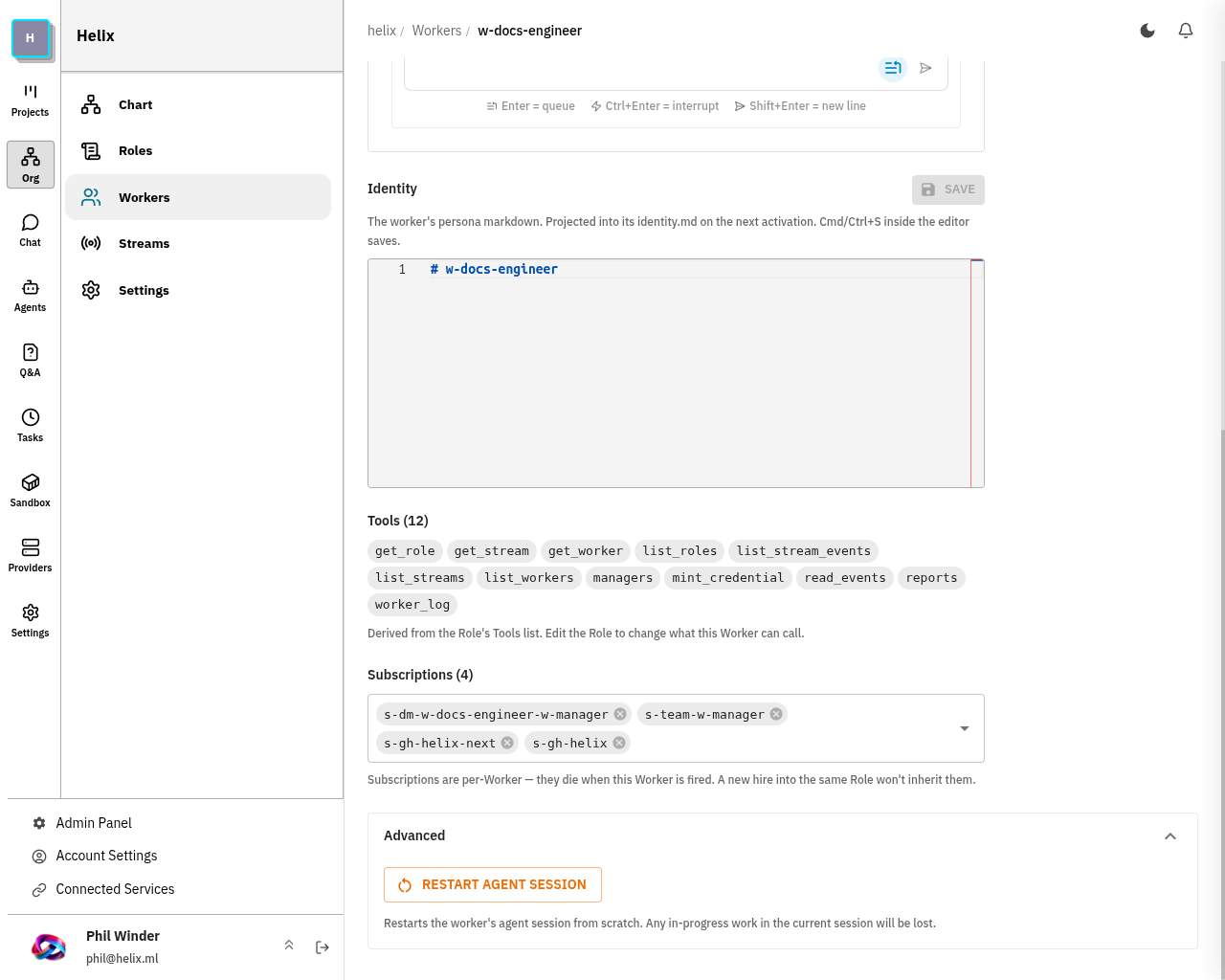
This stops the current desktop container and recreates it from scratch. The worker will be ready to accept the next event immediately. Any uncommitted changes inside the container are lost — work already pushed to a remote branch is unaffected.
I need help
- Helix Cloud: Use the in-app chat support button
- Self-hosted / Enterprise: Email support@helix.ml with your Helix version (
docker compose exec api ./helix version) and relevant logs - GitHub Issues: github.com/helixml/helix/issues
- Discord community: discord.gg/helixml