
Goose Code Agent
Run the AAIF's open-source Goose code agent inside Helix sandboxes, with project-scoped recipes and per-task parameter capture.
Helix can run Goose, the open-source AI coding agent from the Agentic AI Foundation (AAIF) at the Linux Foundation, inside the same isolated sandbox desktop used by every other code agent. Goose runs in Zed via the Agent Client Protocol (ACP), so you get the full streaming-thread experience: tool calls, file edits, and approvals flow through the same UI you already use.
What Goose adds on top of vanilla coding agents is recipes — reusable, parameterised playbooks (triage a failing CI run, write a release note, fix a flaky test). Helix lets you attach a recipe library to a project once, and every spec task you create against that project gets a structured parameter-capture UI for each recipe: pick a recipe from a dropdown, fill in its declared inputs, submit. The agent receives a fully baked recipe at session start — no free-text prompting, no interactive back-and-forth to gather context. Recipes are also available as slash commands inside the Goose thread for ad-hoc use.
Selecting Goose for a project
Set the assistant's runtime to goose_code in your project YAML:
apiVersion: helix.ml/v1alpha1
kind: Project
metadata:
  name: my-app

spec:
  description: "App using Goose for coding tasks"

  repositories:
    - url: "https://github.com/org/my-app"
      branch: main
      primary: true

  agent:
    name: "Goose Agent"
    runtime: goose_code
    model: claude-sonnet-4-6
    provider: anthropic
That alone gives you a working Goose agent — every new session in this project spawns Goose inside Zed with no further configuration.
Project recipes
Recipes are YAML files living inside one of the project's attached repositories. Declare them on the agent and Helix exposes them as options on the spec-task creation form, with a parameter UI per recipe:
  agent:
    name: "Goose Agent"
    runtime: goose_code
    model: claude-sonnet-4-6
    provider: anthropic

    goose:
      # Optional — when omitted, recipe paths resolve against the
      # primary repo. Set this only if recipes live in a separate
      # repo attached to the project.
      # recipe_repo_url: "https://github.com/org/goose-recipes"

      recipes:
        - name: triage
          path: .goose/recipes/triage.yaml
        - name: fix-flaky-test
          path: .goose/recipes/fix-flaky-test.yaml
Spec-task authors will see triage and fix-flaky-test in the Goose Recipe dropdown on the task creation form, with the declared parameters rendered as a form below it. The same recipes are also available as /triage and /fix-flaky-test slash commands inside the Goose thread if someone wants to invoke them interactively rather than from a spec task.
Recipe file format
A recipe is a small YAML document the agent reads at runtime:
version: "1.0.0"
title: "Triage failing CI"
description: "Walk through a failing CI run and produce a triage note."

instructions: |
  You are helping diagnose a failing CI run. Stay focused on the run
  the user pasted; do not wander into unrelated branches.

prompt: |
  Investigate the failing CI run at {{ ci_url }} for branch {{ branch }}.
  Identify the failing step, root-cause the failure, and produce a
  triage note covering what failed, the likely cause, the smallest
  plausible fix, and whether the failure looks flaky.

parameters:
  - key: ci_url
    input_type: string
    requirement: required
    description: "URL of the failing CI run"
  - key: branch
    input_type: string
    requirement: required
    description: "Branch the run was for"
Parameters become Jinja-style {{ var }} placeholders inside prompt and instructions. Required parameters must be supplied; optional parameters can declare a default.
If a declared recipe file is missing or malformed, Helix surfaces a warning in the project settings UI rather than failing the whole agent — the rest of the recipes continue to work.
Starter recipes
The Helix repo ships a handful of ready-to-use recipes under examples/goose_recipes/ — triage, flaky-test fix, release notes, spec review, error-log triage, implement-from-spec. They cover the full range of parameter types (string, file, select).
You can either copy them into your own repo at .goose/recipes/<name>.yaml, or skip the copy entirely by attaching helixml/helix as a second repository on your project and referencing them by path:
spec:
  repositories:
    - url: "https://github.com/org/my-app"
      branch: main
      primary: true
    - url: "https://github.com/helixml/helix"
      branch: main

  agent:
    runtime: goose_code
    goose:
      recipe_repo_url: "https://github.com/helixml/helix"
      recipes:
        - name: release-notes
          path: examples/goose_recipes/release-notes.yaml
path is repo-relative and free-form — .goose/recipes/ is convention, not a requirement.
Spec-task recipes
When you create a spec task against a Goose project, the task creation form shows a Goose Recipe dropdown listing every recipe the agent advertises. Pick one, fill in the parameter form, and submit.
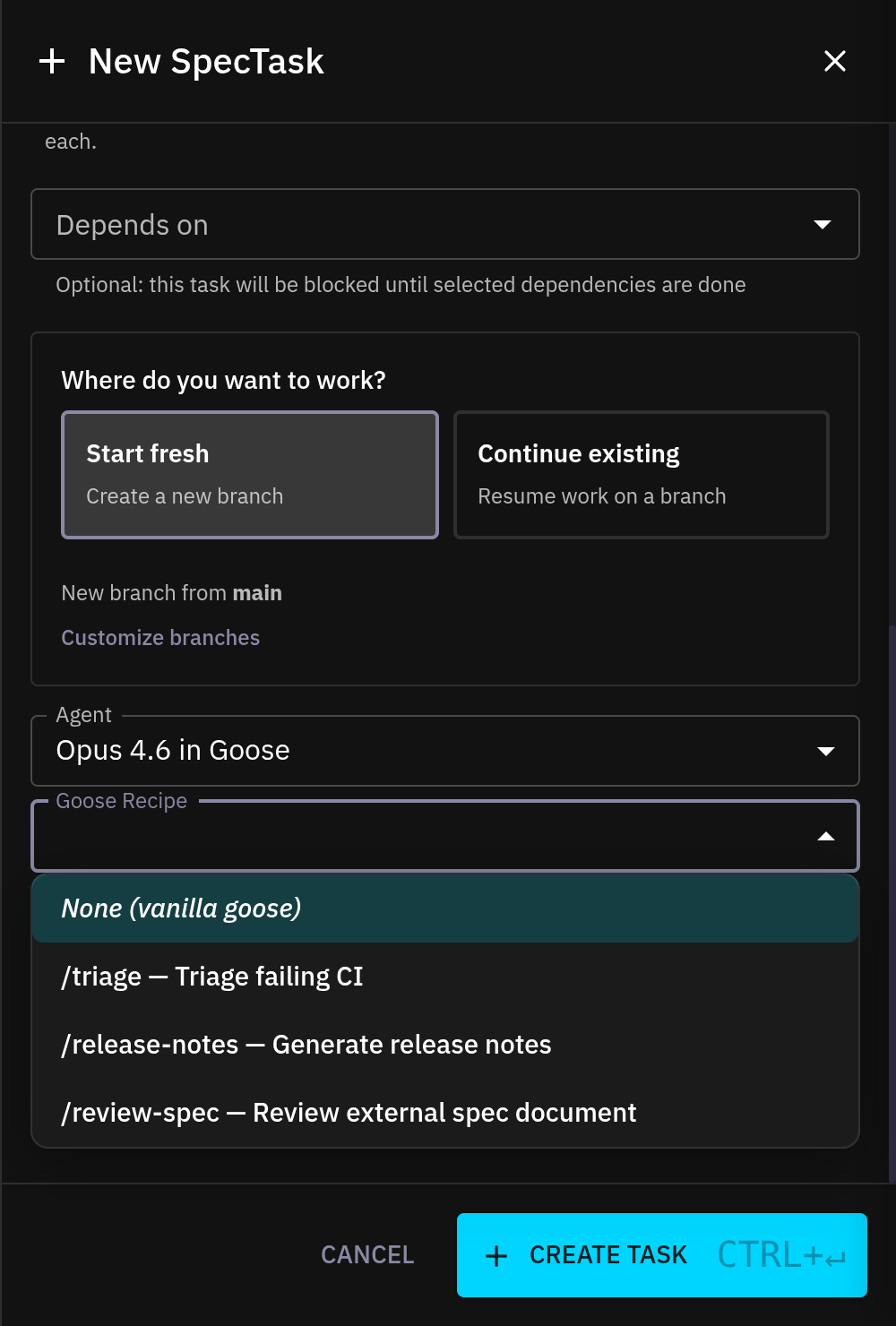
Helix bakes your parameter values into the recipe at session-start time, then hands Goose a ready-to-run slash command with no further prompts. This is the difference from running the slash command interactively: the values are captured up front, recorded on the spec task, and don't need to be re-entered.
Leave the dropdown on "None (vanilla goose)" to skip the baked recipe and run the agent with only the project-level recipes available as slash commands for interactive use.
Parameter forms by example
Each recipe's parameters[] block becomes a form rendered directly under the recipe dropdown. The three bundled starter recipes cover the common parameter shapes:
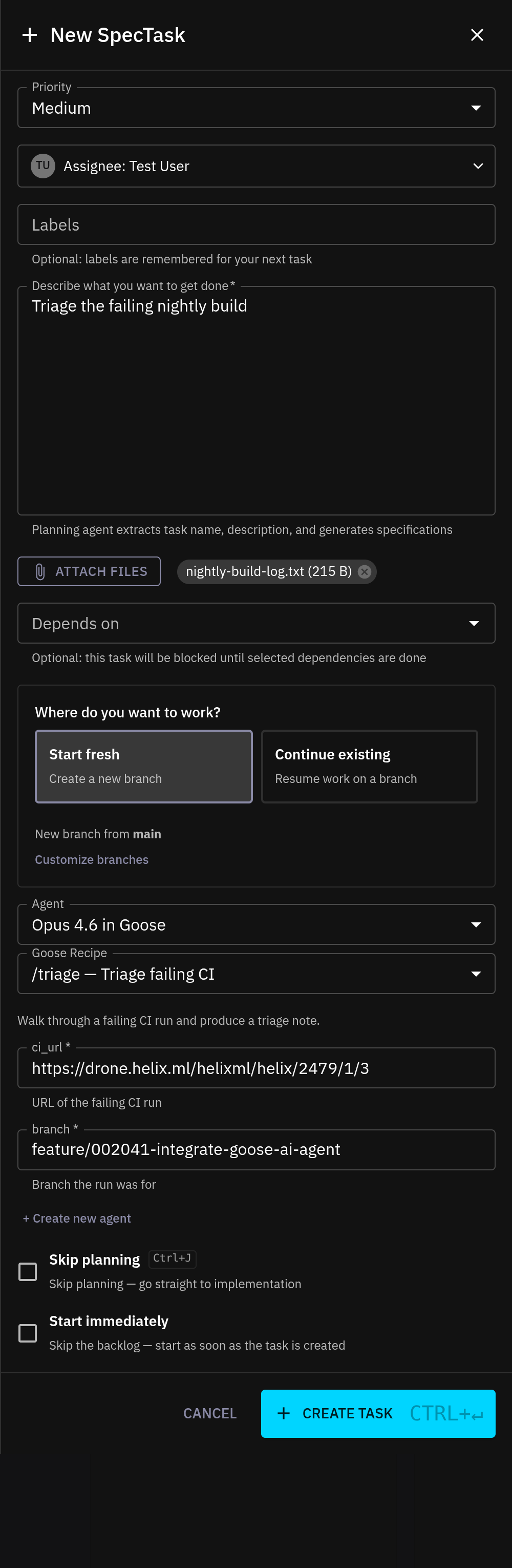
triage.yaml — two required strings. The simplest case: free-form text inputs for the CI URL and branch name.
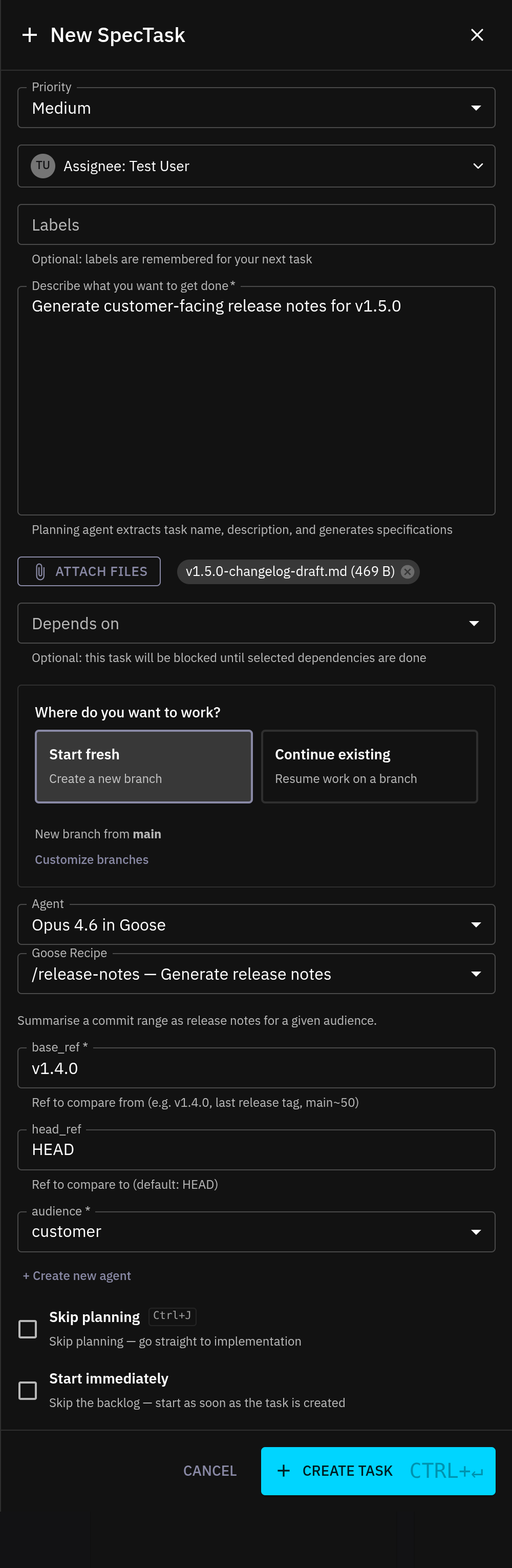
release-notes.yaml — strings, defaults, and a select. base_ref is required, head_ref has a default of HEAD pre-filled, and audience renders as a dropdown because the recipe declared options: [engineering, customer, marketing].
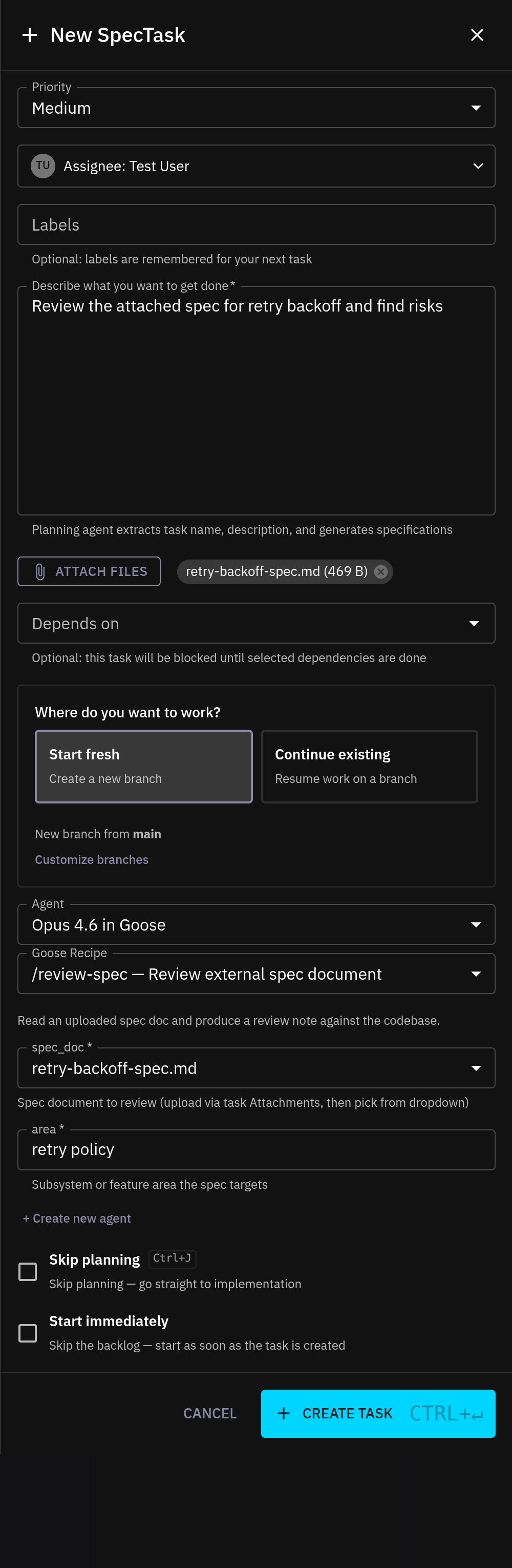
review-spec.yaml — a file parameter. The spec_doc dropdown is populated from the files staged in the form's Attachments section — no separate upload step. See the File inputs section below for what happens at session start.
File inputs
A recipe parameter can declare input_type: file instead of string. When you create a spec task against a recipe with file parameters, the dropdown for that parameter is populated from the files you've staged in the Attachments section of the same form — no separate upload step.
parameters:
  - key: spec_doc
    input_type: file
    requirement: required
    description: "Spec document to review"
Helix commits the attachment to the project's helix-specs branch the same way it does for any other spec-task attachment, then rewrites the parameter value from the bare filename to the absolute path inside the agent's workspace before handing the recipe to Goose. The agent sees an ordinary file path it can Read with its normal tool calls — no inline embedding, no size limit beyond the attachment limit itself.
This works for any file type Goose can sensibly consume: spec PDFs and markdown, CSVs to triage, log dumps to diagnose, screenshots to caption.
Why use Goose over the default agent?
- Parameter capture at task creation. Spec-task authors pick a recipe from a dropdown and fill in a structured form instead of free-typing context — easier to review, easier for agents to act on consistently, and the captured values are recorded on the task itself.
- Recipes as first-class. Codify "how we triage", "how we cut a release note", "how we land a Dependabot bump" once, version it in the repo, and surface it as a structured UI on every spec task in the project. The same recipes are also available as slash commands inside the thread for interactive sessions.
- Same sandbox, same UI. Goose runs in the same isolated desktop and streams through the same WebSocket UI as every other code agent — see Sandboxes for the underlying architecture.
Limits
- Recipes live in a git repository — author them with your normal review flow. There is no in-Helix recipe editor.
- Per-task parameter values are baked at session start. If you want to change values mid-session, restart the session with a new spec task.
- A project's recipes apply to that project's Goose agent only. To share recipes across projects, point each project's
recipe_repo_urlat the same shared repo.