
How to Build Applications on Top of Helix
Sep 22, 2026
Keep your application's workflow and use Helix to run complex agent tasks in isolated workspaces, report progress, and return useful outputs.
An application can use Helix to run agents without rebuilding the product around an agent UI. The application keeps its users, permissions, approvals and business data. Helix receives a goal, starts an agent in an isolated workspace and returns progress and outputs.
This split is useful when work takes more than one model response. An agent may need to inspect a repository, use a browser, run commands, create files and ask a person for a decision. Helix manages that working environment while your application decides why the work exists and what happens next.
Helix is not tied to one model. Current open models already handle serious agent work: in our recent serving tests, GLM-5.3-Flash handled the agent tool protocol, while Qwen3.8-Flash-Next passed checks for tool calling, reasoning, images and a 251K-token prompt. Applications can route different work to Helix projects configured with different models without changing their product workflow.
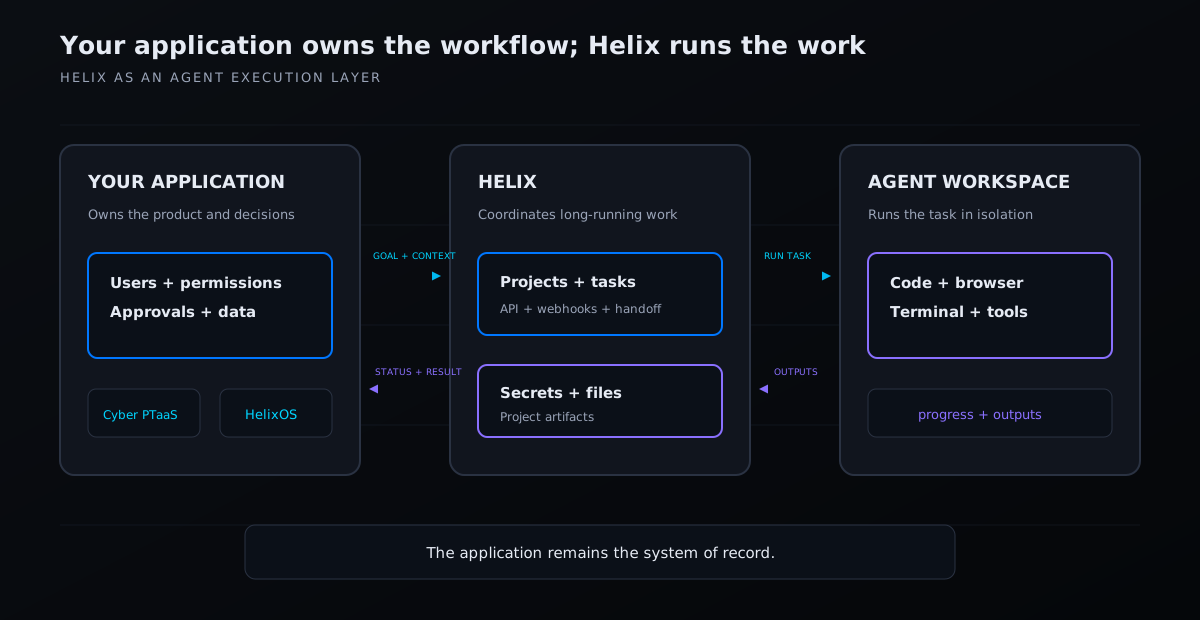
Your application owns the workflow. Helix runs the work.
Keep the application in charge
Your application remains the system of record. A security portal still owns assessment scope and customer approvals. An operations product still owns schedules, teams and business rules. Helix does not need to replace either interface.
Instead, the application maps its work to a Helix project. The project supplies repositories, instructions and secrets. Each task then runs in its own workspace with the selected agent and tools.
People can watch or take over a live session when useful. The rest of the time, Helix can remain behind the product's interface.
The integration loop
Most integrations need four steps:
- Prepare a project. Connect the repositories, instructions and project secrets the agents need.
- Submit a task. Send the desired outcome and relevant context through the Helix API. Helix creates the workspace and starts the agent.
- Follow progress. Read task state through the API and use signed webhooks for fast updates. We route production callbacks through Webhook Relay's durable retries so brief outages do not lose them.
- Use the result. Fetch the files or artifacts the agent produced, validate them in your application and move the workflow forward.
Treat a webhook as a notification, not the result itself. Fetch the current task and its outputs from Helix before approving a change, publishing a report or triggering more work.
Two applications built this way
Helix Cyber manages penetration-testing engagements. It owns the signed Rules of Engagement, customer accounts, findings workflow and retest approvals. Helix runs the security tasks and returns findings and reports. The customer sees a security product, not a general agent console.
Cyber keeps that product state in PocketBase. For a production PocketBase application, use its built-in backups with a separate S3-compatible bucket, or use Litestream when continuous SQLite replication is a better fit. Keep uploaded files and encryption keys in the recovery plan, store copies away from the application host and test full restores regularly.
HelixOS is our internal operating system for organising bots and work across Helix projects. It schedules work, sends tasks to the right project and monitors their lifecycle through its own interface. Helix supplies the agent workspaces underneath it.
The same pattern fits support investigations, release qualification, infrastructure changes and research workflows. It works best when a task needs several tools, runs for minutes or hours, or benefits from an inspectable workspace. For a quick text completion, a direct model API is usually the simpler choice.
Start with projects and spec tasks, then see how isolated agent workspaces run each task. The Helix source and API are available on GitHub.